Forth
If you're a 62 year-old programmer like me, then you will definitely have heard of Forth, the super-efficient programming language available as a ROM module for the Sinclair ZX-81.

A few years passed, and suddenly, there was a that strange little programming language again. This time, it had snuck out of your tiny home computer and into a big and professional Unix workstation, calling itself OpenBoot.
In the meantime,Free Software was conquering the world. Linux pushed Windows and Unix out of Workstations, Supercomputers, Servers, routers, smartphones and a funny little thing called the Raspberry Pi, smaller than the ZX-81 and several times as powerful as the Sun Ultra 60.
Computers were getting smaller and cheaper all the time until one day, you would buy a dual core, single board computer for about three Euros, or in my case, you could buy 5 of them for the price of a glass of beer.
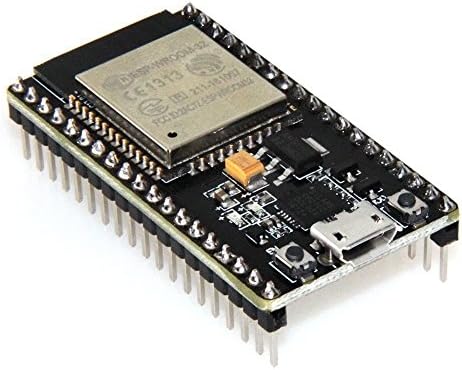
Enter ESP32Forth
I began playing with these little devices in 2017, when my wife gave me an Espduino-controlled robot arm for Christmas.
 |  | |
| I put it together, installed the Arduino IDE and began programming. |
A Message From Peter Forth
Four years passed and I learned to enjoy my new found hobby, until one day, a strange message appeared in my inbox, from a guy named Peter Forth.
To paraphrase: Knock, knock. Can you spare a few minutes to talk about a programming language called Forth, which will save you time and effort when working with the ESP32?
I must have been waiting for that message all my life, because I got hooked before I even tried.
Possessed, I gobbled up Leo Brodie's Starting Forth in two days and swallowed it down with cold instant coffee. I kept hacking on the keyboard until I saw that blue, blinking light, telling me I was on my way to Forthdom.
Next up: The the HC-SR04 Ultrasonic distance meter.
Every time I needed access to Arduino libraries, I could use my C-knowledge and add them to the ESP32Forth.ino file.
This way, I was able to write a Forth driver for the HC-SR04 with only one addition to the .ino sketch, namely a Forth word for pulseIn().
PIN_TRIG output pinmode
: trig low PIN_TRIG pin 2 ms high PIN_TRIG pin 20 ms low PIN_TRIG pin ;
Peter Forth applauded my efforts and wondered if I had seen his library for the 1306 Oled screen.
Next, I sent him a video where I measure distances with the Ultrasonic sensor and printing them on an Oled screen using a version of his driver modified for the 1305.
Encouraged by praise and progress, I added a driver for the Adafruit PWM servo controller, promoting the idea of pointing the Ultrasound sensor in any direction, measuring the distances and building an internal map of the surroundings.
And here I am, barely a month after, working feverishly on the Forthmobile.

22 constant PIN_SCL
21 constant PIN_SDA
19 constant PIN_ECHO
18 constant PIN_TRIG
5 constant PIN_PWMB
17 constant PIN_IN4
16 constant PIN_IN3
32 constant PIN_IN2
33 constant PIN_IN1
25 constant PIN_PWMA
1 constant LEFT
2 constant RIGHT
3 constant BOTH
1 constant FORWARD
FORWARD negate constant BACKWARD
Forth ledc
( Ultrasound SR04 high level forth library Atle Bergstrøm 2021 )
( ... delay between lines is useful when uploading over WIFI )
: init
PIN_TRIG output pinmode
PIN_ECHO input pinmode
PIN_IN1 output pinmode
PIN_IN2 output pinmode
PIN_IN3 output pinmode
PIN_IN4 output pinmode
PIN_PWMA LEFT ledcAttachPin
PIN_PWMB RIGHT ledcAttachPin
LEFT 4096 8 ledcSetup
RIGHT 4096 8 ledcSetup
;
init
: >pwmAB ( speed -- )
." setting PWM to " cr
." left: " dup . LEFT swap ledcWrite
." right " dup . RIGHT swap ledcWrite
;
: motor_stop
LOW PIN_IN1 pin
LOW PIN_IN2 pin
LOW PIN_IN3 pin
LOW PIN_IN4 pin
0 0 >pwmAB
;
: >left_gear ( forward | backward -- )
." Setting pins left side "
forward = if
." to forward " cr
HIGH PIN_IN1 pin
LOW PIN_IN2 pin
else
." to backward " cr
LOW PIN_IN1 pin
HIGH PIN_IN2 pin
then
;
: >right_gear ( forward | backward -- )
." Setting pins right side "
forward = if
." to forward " cr
HIGH PIN_IN3 pin
LOW PIN_IN4 pin
else
." to backward " cr
LOW PIN_IN3 pin
HIGH PIN_IN4 pin
then
;
: drive ( leftPwm rightPwm direction -- )
dup >right_gear >left_gear
>pwmAB
;
: turn ( pwm left|right --)
left = if
forward >left_gear
backward >right_gear
else
backward >left_gear
forward >right_gear
then
dup >pwmAB
;
: trig low PIN_TRIG pin 2 ms high PIN_TRIG pin 10 ms low PIN_TRIG pin ;
: echo PIN_ECHO HIGH 0 pulsein ;
: scan trig echo . cr ;
To upload the program over the serial port, I wrote a small C program.
#include <sys/stat.h>
#include <fcntl.h>
#include <stdlib.h>
#include <string.h>
#include <errno.h>
#include <termios.h>
#include <unistd.h>
int main(int ac, char*av[])
{
struct termios tio;
char outbuf[256];
char inbuf[256];
char* portname = "/dev/ttyUSB0"; // default
printf("Upload Forth code to ESPForth\n");
printf("(C) 2021 Jan Atle Ramsli\n");
if (ac < 2){
perror("Usage uf [filename] {port}");
exit(-1);
}
FILE *f = fopen(av[1], "r");
if (! f){
perror(av[1]);
exit(-1);
}
printf("File to upload: %s\n", av[1]);
if (ac == 3){
portname = av[3];
}
printf("Port: %s\n", portname);
cfmakeraw(&tio);
cfsetospeed(&tio,B115200);
cfsetispeed(&tio,B115200);
tio.c_cc[VMIN]=0;
tio.c_cc[VTIME]=10;
int serial_fd=open(portname, O_RDWR);
if (serial_fd < 0){
perror(portname);
exit(1);
}
tcsetattr(serial_fd,TCSANOW,&tio);
int lno = 0;
printf("Uploading ...\n");
read(serial_fd, inbuf, 255); // clean out the shit
while(fgets(outbuf, 255, f))
{
lno++;
write(serial_fd, outbuf, strlen(outbuf));
sleep(1);
read(serial_fd, inbuf, 255);
printf("\rLine %d ", lno);
if (! strstr(inbuf, "ok")) {
printf("%s ", inbuf);
}
fflush(stdout);
if (strstr(inbuf, "ERROR")){
printf(" %s %s\n", outbuf, inbuf);
fflush(stdout);
fclose(f);
close(serial_fd);
exit(1);
}
}
printf(" lines successfully uploaded to ESPForth\n");
fclose(f);
close(serial_fd);
}
You sent Today at 4:25 PM

Adrian sent Today at 4:27 PM
You sent Today at 4:27 PM
Adrian sent Today at 4:29 PM
You sent Today at 4:30 PM
Adrian sent Today at 4:31 PM

You sent Today at 4:32 PM
Adrian sent Today at 4:33 PM
You sent Today at 4:34 PM
Adrian sent Today at 4:34 PM
You sent Today at 4:34 PM
Adrian sent Today at 4:35 PM
You sent Today at 4:35 PM
Adrian sent Today at 4:36 PM
You sent Today at 4:36 PM
Adrian sent Today at 4:38 PM
You sent Today at 4:38 PM
Adrian sent Today at 4:38 PM
You sent Today at 4:39 PM
However ...
None of this teaches me to program in Forth. I learn the RPN syntax, where the parameters are on the stack and how to interface Forth with C.
Do it once or twice, and it's not much of a brain challenge anymore.
I need to write some real Forth, and for that I must go back to Leo Brodie's book and do some examples.
Let's start at Chapter 8.
: eat-pie pies @ 0 > if 1 - pies ! ." Thank you" cr else ." What pie?" cr then ;
create frozen-pies 0 ,
: freeze-pies pies @ frozen-pies ! 0 pies ! ;
: .base base @ dup \ one of print one for restore
These are almost identical to the ones found in the Answers section.
The next one is not. Too impatient to go back and find out how I should have done it, I press on. I want to make the board play.
: .bline ( u -- )
: .board ( -- )
: bcell ( u -- addr board cell # u)
: x! dup bcell 88 swap ! .board drop ;
: 0! dup bcell 48 swap ! .board drop ;
: nx ( u1 u2 -- i index of u1 starting at index u2)
clear
And this is where I am right now.
